
eGRANT Search
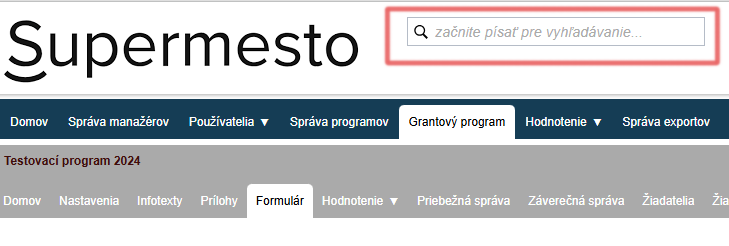
One of the current innovations is full-text search, which facilitate navigation and it allows cross-program search.
Make full-text search more efficient:
- eGRANT system navigation – you can search for notifications, custom forms, or personalized texts by keyword,
- Applicant/Request Search across programs (challenges).
You will always find the search engine At the top of the screen to the right of the logo your city (subject).
The search is sensitive to word forms, therefore only enter the root of the word.
Regardless of where the manager is in the system, the system will display complete search results across:
➔ Users – searches if the given applicant is registered in the system (e.g., by email). If the applicant is registered, the system will display in which program/call.
➔ Programs – Search for entities across all programs/calls.
➔ Requests - Search for requests by project name or applicant.
➔ My own forms – search for a custom form by name.
➔ Notifications – search for notifications by name.
➔ To personalized texts – search in custom texts by title.
You can also search by keyword - you don't need to know the exact name, just start typing a keyword that you know is in the name (e.g., „change“) - the system will roll out results containing the search term.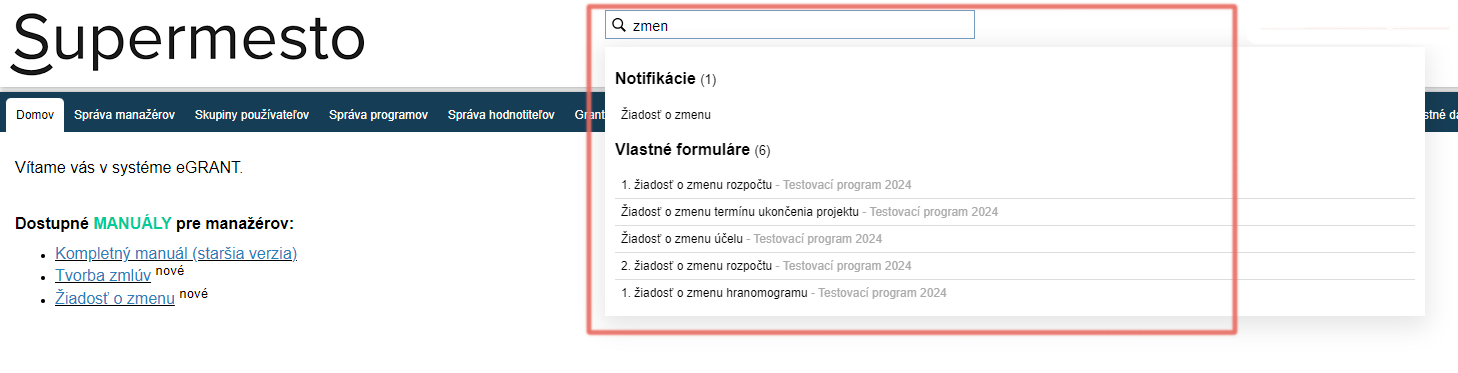
Overview of Terms
User a person who has a profile (account) created in the system with login credentials (email and password) - this can be either an applicant or a reviewer.
Applicant = applicant for a grant/subsidy.
The applicant = It can refer to the user (profile) or the applicant (entity requesting the subsidy).
In the eGRANT system, the „user“ fills out the application form – this is the person who registered in the system with their email. However, this person is usually also the statutory representative of the entity applying for the grant, meaning they are also the „submitter/applicant.“
Application = grant application form for a specific project by a specific applicant.
Custom form = a form created within the eGRANT system for various purposes (other than grant applications and final reports), e.g., for requesting additional data from the applicant, or a form through which the applicant can request a budget change, or a form accessible only to managers (e.g., for the purpose of formal application review).
You can create them in the „Custom forms“specific program/challenge.
Custom Texts = informational texts that you can use to address an applicant or evaluator in various places, in which you can provide important information, etc.
You will find them in the „Custom Texts“at the instance level (uniform for all programs/challenges.)
Notification = a message that is sent automatically to the email of either the requester or the manager.
You will find in the tab „Notifications“be at the instance level (uniform for all programs) or at the individual program/challenge level.