
What do you need help with?
List of registered applicants
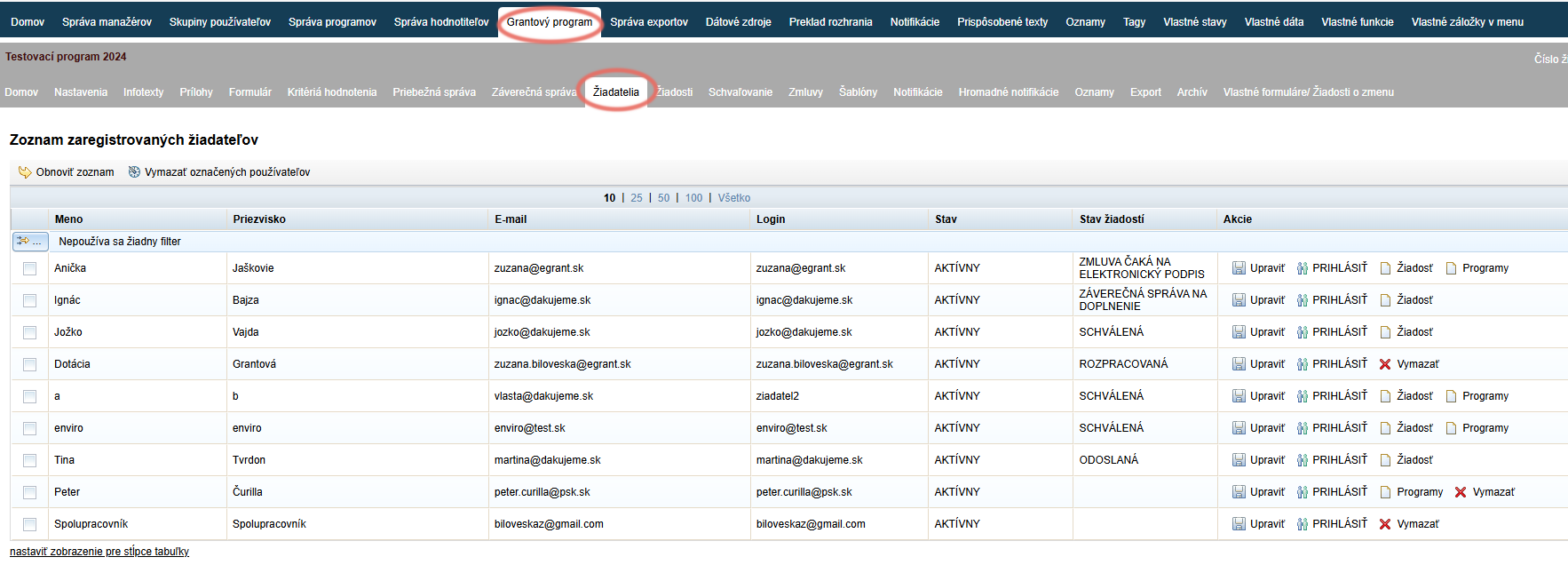
-
First and last name that the applicant provided during registration
-
Email and login (the login is identical to the email provided during registration and cannot be changed)
-
Status of the applicant:
- ACTIVE – the applicant can use their account to its full extent.
- WAITING FOR VERIFICATION – the applicant has registered for the programme and a link has been sent to their email; by clicking the link, the applicant confirms the registration. After confirmation, the status changes to „Active“.
- PASSIVE – the applicant’s account is inactive; it is not possible to log in.
-
Application status – shows the current status of the application (or multiple applications) of this applicant
-
Column „Actions“ – in this column you can:
- Edit the profile (email, password, status) of the applicant by clicking the „Edit“.
- Log in as this applicant by clicking the „LOG IN ”, if you have the „impersonation“ permission.
To log back in as a manager, click the „Log in as original user ” in the upper right corner of the screen. - View the application of this applicant by clicking the „Application ” (if the application has already been submitted).
- View which other programmes the applicant is registered in by clicking the „Programmes ” (displayed only for applicants who are registered in more than one programme).