
What do you need help with?
-
Overview and settings
-
Forms
- Manuals will be coming soon.
-
Management of applications
-
Evaluation and approval
-
Contracts and other documents
-
Exports
-
Participatory budget
In the eGRANT system you can generate contracts or other documents (in Word or PDF format) for individual applications and send them to applicants automatically by email. In these documents you can load specific data from any form in eGRANT (grant application, final report, custom form, etc.).
Contracts
When working with contracts in eGRANT, the main tab used is „Contracts“, in the menu at the programme level. Here you will find a list of all applications that have been approved (so you will not accidentally send a contract to an applicant whose application was not approved).
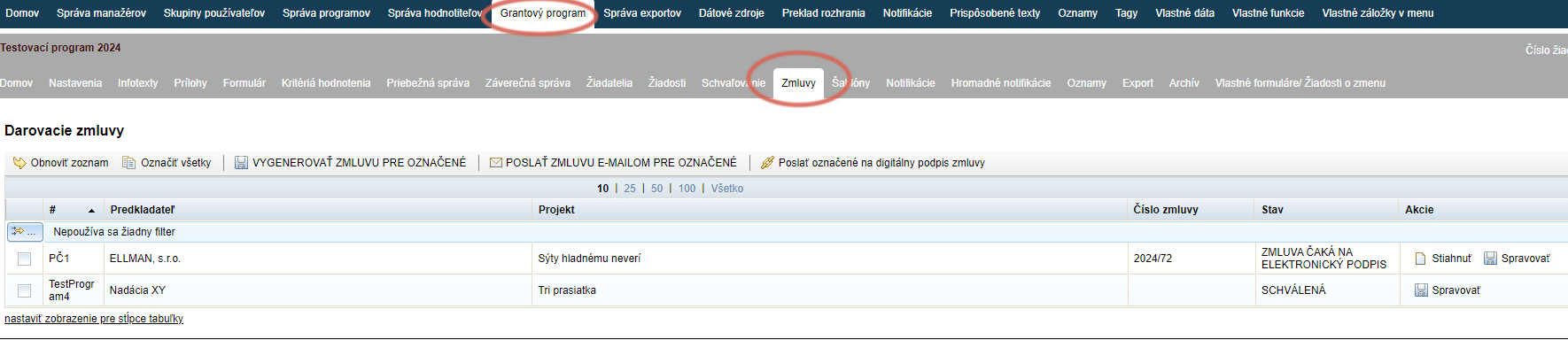
In this tab you generate contracts, and you can also directly send them to the applicants’ email addresses.
When creating contracts in eGRANT, remember the following:
Set up the numbering format
Before generating contracts, set up the contract numbering format in the „Settings“ na úrovni programu.
Contract template format
Create the contract template in Word or OpenDocument format and make sure the document does not contain any hidden formatting (e.g. paragraph numbering format or bullet point format).
Do not forget to upload in the „Settings“ na úrovni programu.
Loading data
Keep in mind that only data that is available somewhere can be automatically loaded into the contract (either filled in by the applicant in a form, or recorded by eGRANT – e.g. the application submission date).
Also keep in mind that the loaded data can only have the format that a Word document allows – the appearance of the data in the final contract is determined by the capabilities of the Word application.
Notification email
When sending contracts to applicants, a notification email with the contract document attached is sent automatically.
You can find this notification email in the „Notifications“ tab under the name „Sending the donation contract“ and you can customise it for all programmes uniformly in the menu at the organisation level, or only for a specific programme in the menu at the programme level.
Electronic signature
Applicants can also sign contracts electronically – this feature is subject to a fee; please contact us if you are interested.
In the case of electronic signing, a different notification email is sent to applicants: „Notification for digital contract signing“.
Other documents
In eGRANT you can also generate other documents besides contracts. Use the „Templates“ v menu na úrovni programu.
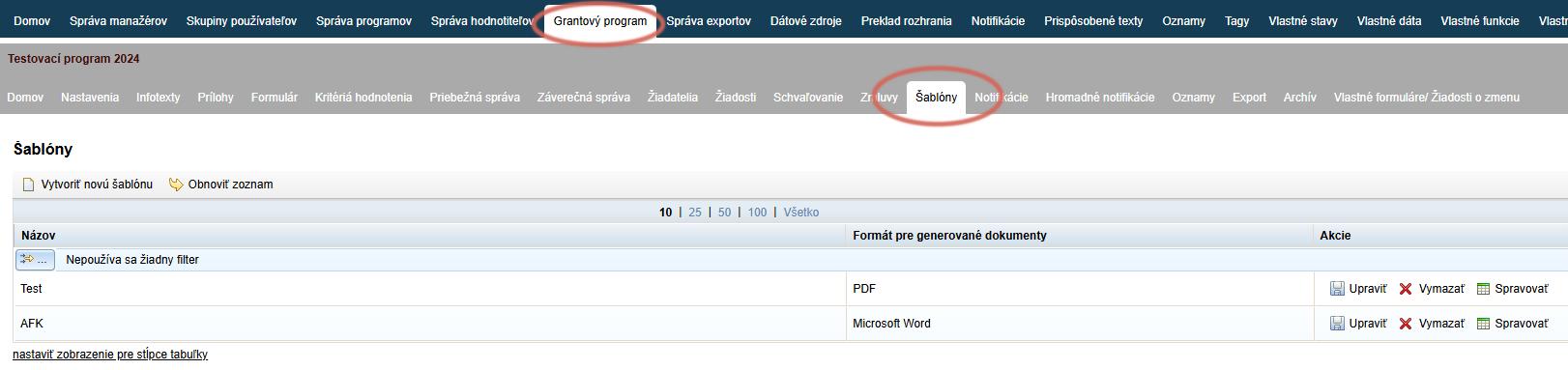
Here you upload a document template, generate generate it for specific applications, and also send them to the applicants’ email addresses.
- Multiple types of contracts – if you do not use a single contract template for all applications.
- Various opinions or calls – any official text documents that you need to send to applicants by email.
Unlike contracts, to send other documents you must notification email create the notification email in the „Bulk notifications“ na úrovni programu.
When creating templates in eGRANT, remember the following:
Document template format
Create the document template in Word or OpenDocument format and make sure the document does not contain any hidden formatting (e.g. paragraph numbering format or bullet point format).
Upload the document template in the „ in the „Templates“ na úrovni programu.
Loading data
Keep in mind that only data that is available somewhere can be automatically loaded into the template (either filled in by the applicant in a form, or recorded by eGRANT – e.g. the application submission date).
Also keep in mind that the loaded data can only have the format that a Word document allows – the appearance of the data in the final contract is determined by the capabilities of the Word application.
Notification email
Before sending documents to applicants, you must first create a notification email, to which the generated document will be attached. You can create this notification email in the „Bulk notifications“ na úrovni programu.