
If you want to give applicants the option to subsequently change their subsidy application after the form has been submitted, you have two options for allowing them to request this change:
- In the form of a change notice
- In the form of a change request form
Change notice
This is a simple text notice that the applicant can send from their account.
In this way, the applicant can request a budget change and a schedule change.
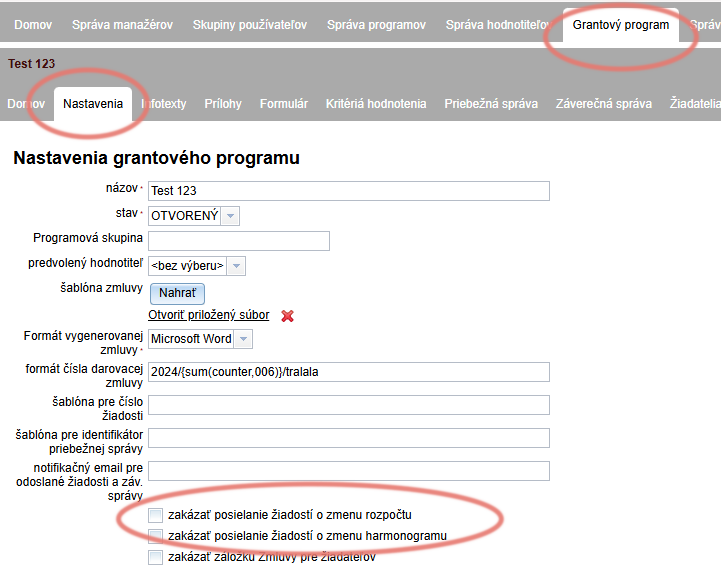
Programme settings
Make sure that you have not ticked “zakázať posielanie žiadostí o zmenu rozpočtu” or “zakázať posielanie žiadostí o zmenu harmonogramu” in the settings.
- the “Nastavenia” tab in the programme-level menu
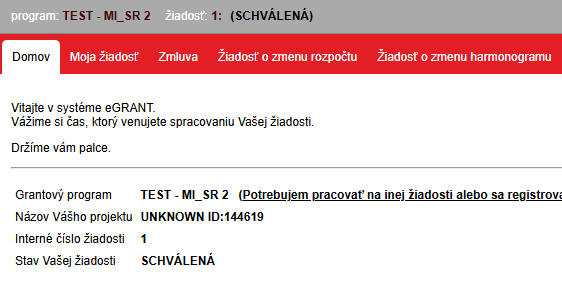
Applicant’s view
If you have enabled the sending of these change notices in the settings, after logging in to their account, the applicant will see the “Žiadosť o zmenu rozpočtu” tab and the “Žiadosť o zmenu harmonogramu” tab next to the “Moja žiadosť” tab.
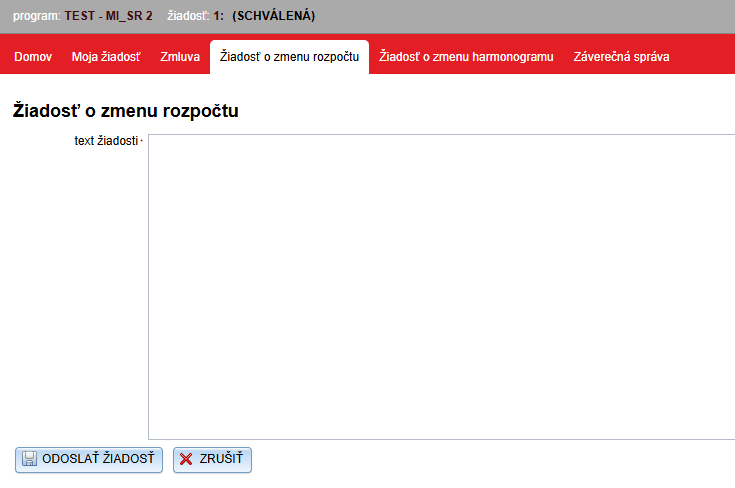
Sending a notice
After clicking one of these tabs, the applicant will see a text window open, where they state what change they are requesting and click the “ODOSLAŤ ŽIADOSŤ” button.
The applicant can send such notices repeatedly.
Manager’s view
The manager can view these notices for a specific application via the “Spravovať” button in the list of applications.
The application-level menu opens, and in the “Žiadosť o zmenu” tab, the manager will find all submitted notices and the date and time they were sent.
