
In the “Schvaľovanie” tab at programme level, you will find a list of all evaluated applications or of applications you have moved to approval (if you do not evaluate applications).
Attention!
For an application to be displayed in the “Schvaľovanie” tab, it must be fully evaluated by all evaluators assigned to it.
Once the application has been fully evaluated, its status automatically changes to “OHODNOTENÁ”.
If you do not evaluate applications
If you do not evaluate applications, you can skip the entire evaluation process and move the applications directly to approval.
In the “Žiadosti” tab, select the projects you want to move to approval and click the “Poslať označené na schvaľovanie” button.

For participation managers
When managing a participatory budget in eGRANT, the projects that were in the voting are displayed in the “Schvaľovanie” tab only after the voting has ended.
You will find more information under the “Participatory budget” category.
Approval of applications
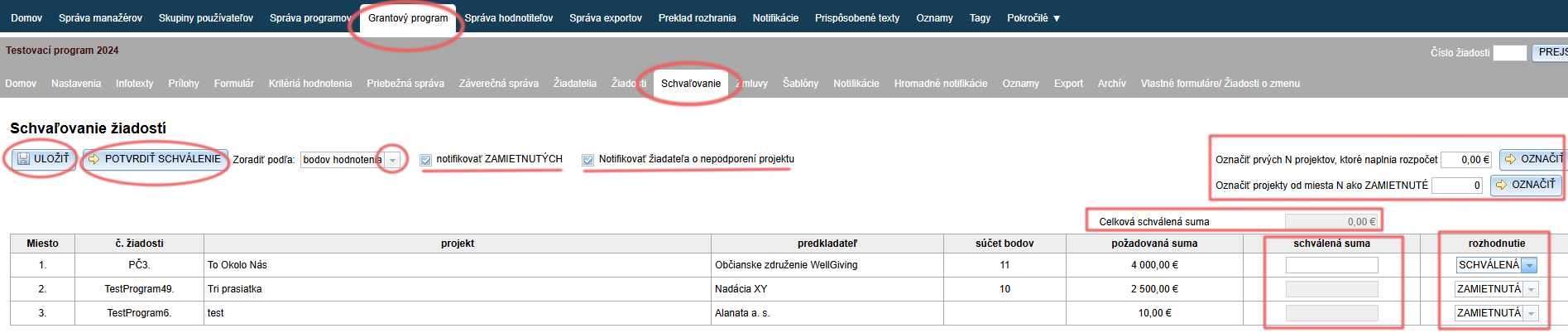
You can sort the list of applications by evaluation points, project title, submitter or requested amount (or by proposed amount, if you require it from evaluators in the evaluation process).
In the “rozhodnutie” column, you can choose whether the application will be approved or rejected, or not supported.
The “nepodporená” decision means that the application will remain in this list even after the approval has been confirmed, and its decision can be changed in the future. The “schválená” or “zamietnutá” decision, on the other hand, is final.If you also require a proposed amount from evaluators in the evaluation process, you will find another column, “navrhovaná suma”, next to the “požadovaná suma” column. This column displays the average of the amounts proposed by all evaluators who evaluated the application.
In the “schválená suma” column, you can enter the amount for approval (for the applications for which you selected the “SCHVÁLENÁ” decision).
All amounts for approval are added up in the “Celková schválená suma” field.
You can also approve / reject applications in bulk.
You can save all changes as you go by clicking the “ULOŽIŤ” button.
If the decisions and proposed amounts for approval are final, you can click the “POTVRDIŤ SCHVÁLENIE” button.
This closes the approval, and all applications that received the “schválená” or “zamietnutá” decision disappear from the list.
At the same time, a notification email is sent for all approved applications.If the “notifikovať ZAMIETNUTÝCH” option is ticked, a rejection notification email is sent for all applications with the “ZAMIETNUTÁ” decision when the approval is confirmed.
If the “notifikovať žiadateľa o nepodporení projektu” option is ticked, a notification email about the project not being supported is sent for all applications with the “NEPODPORENÁ” decision when the approval is confirmed.
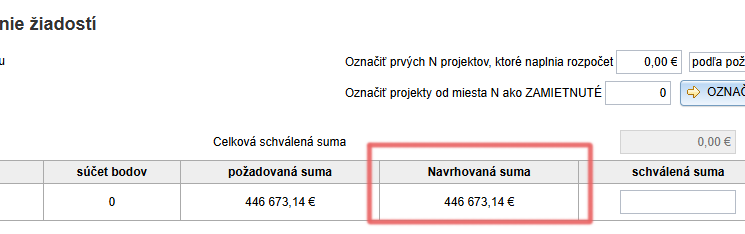
If you want to work with a proposed amount in the approval process, you have two options:
- Add the proposed amount to the evaluation criteria for evaluators. (More information on evaluation criteria here.)
In that case, the “Navrhovaná suma” column displays the average of the proposed amounts from all evaluators who evaluated the application.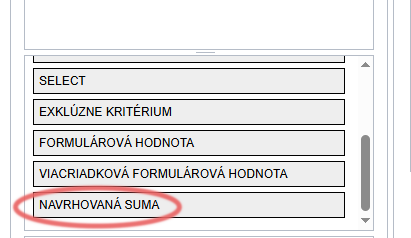
- Enter the proposed amount elsewhere in EGRANT, e.g. in a custom form.
In this case, in the “Nastavenia: Základné nastavenia” tab, enter the tag of the field (the full tag) containing the proposed amount in the “Výraz pre navrhovanú schválenú sumu” line (at the very bottom of the “Nastavenia: Základné nastavenia” tab).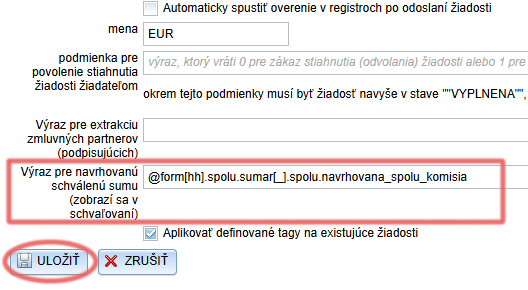
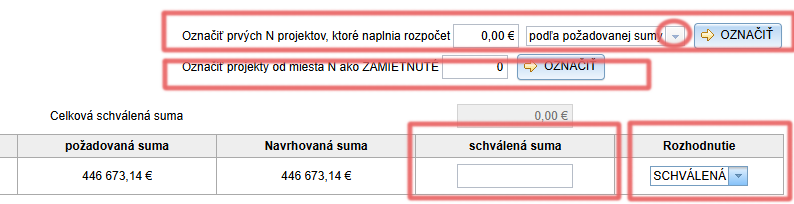
- In the “Označiť prvých N projektov, ktoré naplnia rozpočet” field, enter the total amount available for the programme/call (or an invented amount that is large enough).
- Choose whether the system should be guided by the requested or the proposed amounts. (If you do not use proposed amounts, only the requested amount will be available.)
- Click the “OZNAČIŤ” button.
- The system marks as “SCHVÁLENÁ” as many applications as fit (after adding up their requested/proposed amounts) into the amount you entered in the budget amount field.
- At the same time, the same amount as the requested/proposed amount (depending on what you chose in step 2) is automatically filled in for these applications in the “schválená suma” column.
This field remains editable, so you can adjust the amounts. - You can also mark rejected applications in bulk:
- In the “Označiť projekty od miesta N ako ZAMIETNUTÉ” field, enter the ranking number of the application (the “Miesto” column) from which all applications will be marked as “ZAMIETNUTÁ”.
- Click the “OZNAČIŤ” button.
- In the “Označiť projekty od miesta N ako ZAMIETNUTÉ” field, enter the ranking number of the application (the “Miesto” column) from which all applications will be marked as “ZAMIETNUTÁ”.
- Click the “OZNAČIŤ” button.
- Save the changes by clicking the “ULOŽIŤ” button.
- If the decisions and amounts for approval are final, confirm the approval by clicking the “POTVRDIŤ SCHVÁLENIE” button.
Approved applications
After the approval has been confirmed, the list of all approved applications is displayed in the “Zmluvy” tab.
Attention!
Clicking the “POTVRDIŤ SCHVÁLENIE” button closes the approval.
You will no longer be able to make changes in the “Schvaľovanie” tab, and a notification email with the decision will automatically be sent to the applicants.