
In the “Žiadatelia” tab at programme level, you can also edit an applicant’s profile.
You can use this option, for example:
- if the applicant has forgotten their password and the email with the link to change the password ended up in spam or is blocked by the recipient,
- if the applicant has lost access to the email address they used when registering,
- if the applicant cannot complete their registration because the email with the link to confirm the registration ended up in spam or was blocked by the recipient.
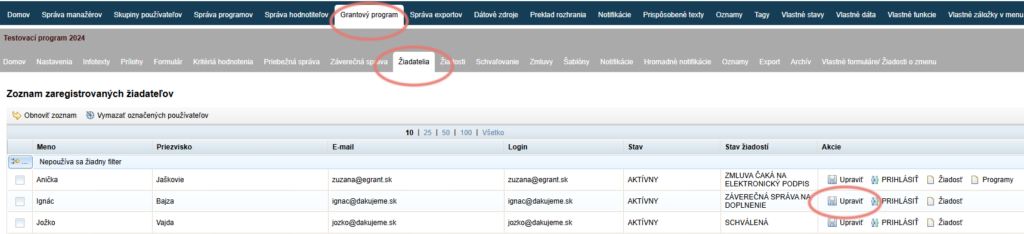
Select an applicant
In the list of all registered applicants, find the applicant you need to edit.
In the “Akcie” column, click the “Upraviť” link.
Edit the details
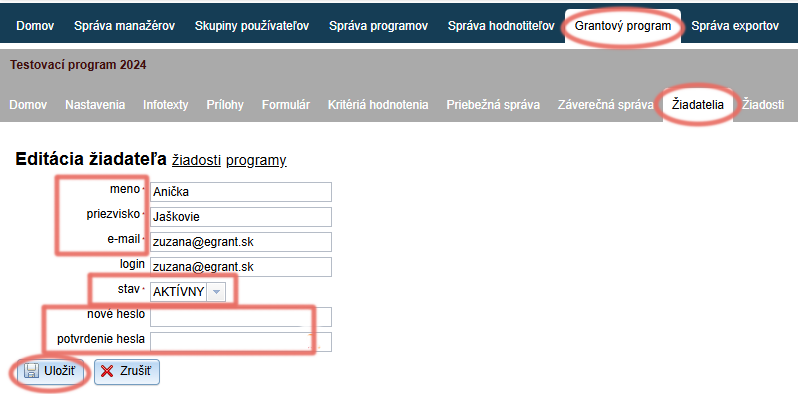
The applicant profile editor is displayed, where you can edit:
- The applicant’s full name
- The applicant’s email
- Applicant status – if you need to activate the applicant’s account, change the status from “ČAKÁ NA OVERENIE” to “AKTÍVNY”.
- The applicant’s password – the original password is never displayed, but you can enter a new password.
Click the “Uložiť” button.