
Creating a new programme (call)
You can create a new programme (call) or edit existing ones in the “Správa programov” tab (calls) in the main menu at organisation level. You can also copy calls here.
Programme management
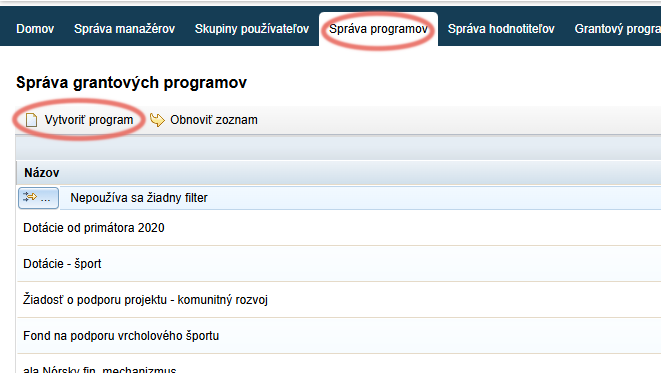
In the “Správa programov” tab, click the “Vytvoriť program” link.
Programme editor
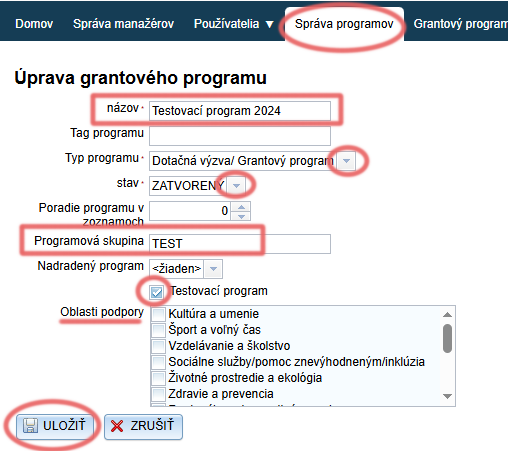
Fill in the programme name.
If you want to group programmes internally by categories, also fill in the programme group.
Choose the programme type:
- “Dotačná výzva/ Grantový program” = for subsidy management purposes
- “Participatívny rozpočet” = for participatory budget management purposes
Choose the status:
- ZATVORENÝ = registration for the programme is closed; the programme is not displayed in the list of open calls
- OTVORENÝ = registration for the programme is open; applicants can register and start completing the application
Ticking the “Testovací program” option means that this programme will not be displayed on the egrant.sk website in the list of open calls.
By ticking one or more options in the “Oblasti podpory” list, this programme will be displayed under the selected categories on the egrant.sk website in the list of open calls.
Click the “ULOŽIŤ” button.
Attention!
You can delete a programme that has already been created in the “Správa programov” tab.
However, if any applicants are already registered for this programme, you will delete the entire programme in this way, including all applications belonging to it.
Manager access to a programme (call)
For a manager to have access to a particular programme, you must assign them to the programme.
Programme management
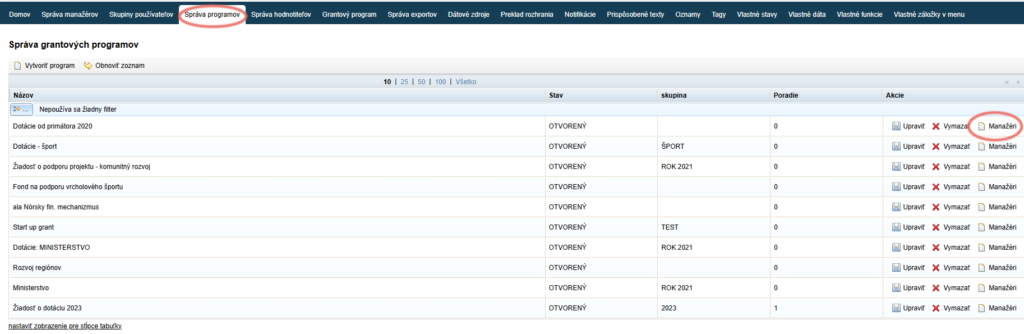
In the “Správa programov” tab, click the “Manažéri” button in the “Akcie” column next to the programme to which you want to assign the manager.
Assigning managers
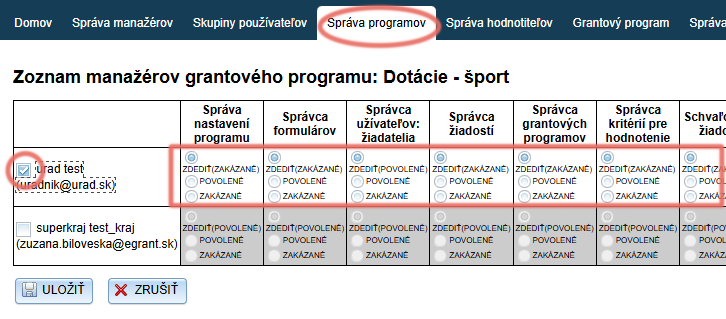
A list of existing managers is displayed. Tick the manager who is to have access to this programme.
You can also change this manager’s privileges for the selected programme. By default, the manager has the same privileges in this programme as were set when their account was created (or as set for their manager group, if they belong to one).
- ZDEDIŤ = the same as what was set when the account was created (or what is set for the manager group, if the manager belongs to one). The brackets always show whether this privilege is currently “povolené” or “zakázané”.
- POVOLENÉ = the privilege will be enabled within this programme (regardless of what was set when the account or manager group was created).
- ZAKÁZANÉ = the privilege will be disabled within this programme (regardless of what was set when the account or manager group was created).
Click the “ULOŽIŤ” button.
Copying a programme (call)
You can also copy a programme (call) that you created in the past in the “Správa výziev” tab (programmes).
The following is copied automatically:
- Programme settings (call settings)
- Programme group
- Managers assigned to the programme (call)
- Infotexts (text on the login page for applicants, header/footer for printed versions of forms)
You can then edit this data.
You can also tick whether you want to automatically copy the forms, evaluation criteria, templates, attachments and notifications as well.
Call management (programmes)
In the “Správa výziev” tab, find the call you want to copy and click “Kopírovať” in the “Akcie” column.
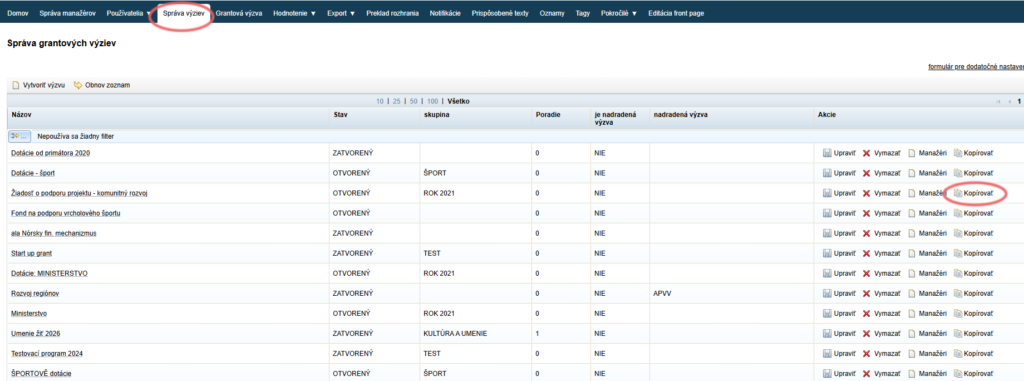
Copy of the call
A copy of the selected call is then created.
Enter a name for this newly created call and tick everything you want to copy from the call.
Note: the call settings, programme group, infotexts and managers assigned to the call are copied automatically – however, you can edit them afterwards.
Click the “ULOŽIŤ” button.
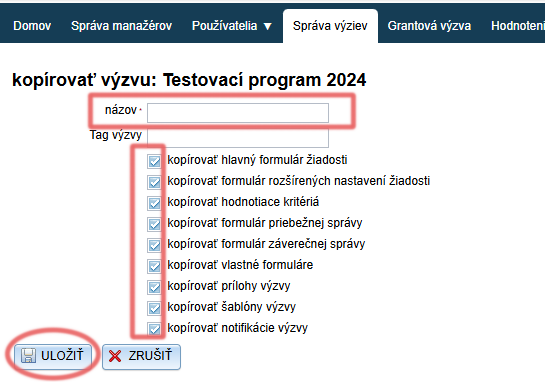
Call (programme) editor
You can then edit the basic details of the call (similarly to when creating a new one):
- name
- group (if you group calls internally by categories)
- programme type: “Dotačná výzva/ Grantový program” = for subsidy management purposes
“Participatívny rozpočet” = for participatory budget management purposes - status:
ZATVORENÝ = registration for the programme is closed; the programme is not displayed in the list of open calls
OTVORENÝ = registration for the programme is open; applicants can register and start completing the application
Ticking the “Testovací program” option means that this programme will not be displayed on the egrant.sk website in the list of open calls.
By ticking one or more options in the “Oblasti podpory” list, this programme will be displayed under the selected categories on the egrant.sk website in the list of open calls.
Click the “ULOŽIŤ” button.