
You can find a list of all registered applicants in a specific programme in the “Žiadatelia” tab in the programme-level menu.
After opening the tab, you will find the following applicant data in the overview table:
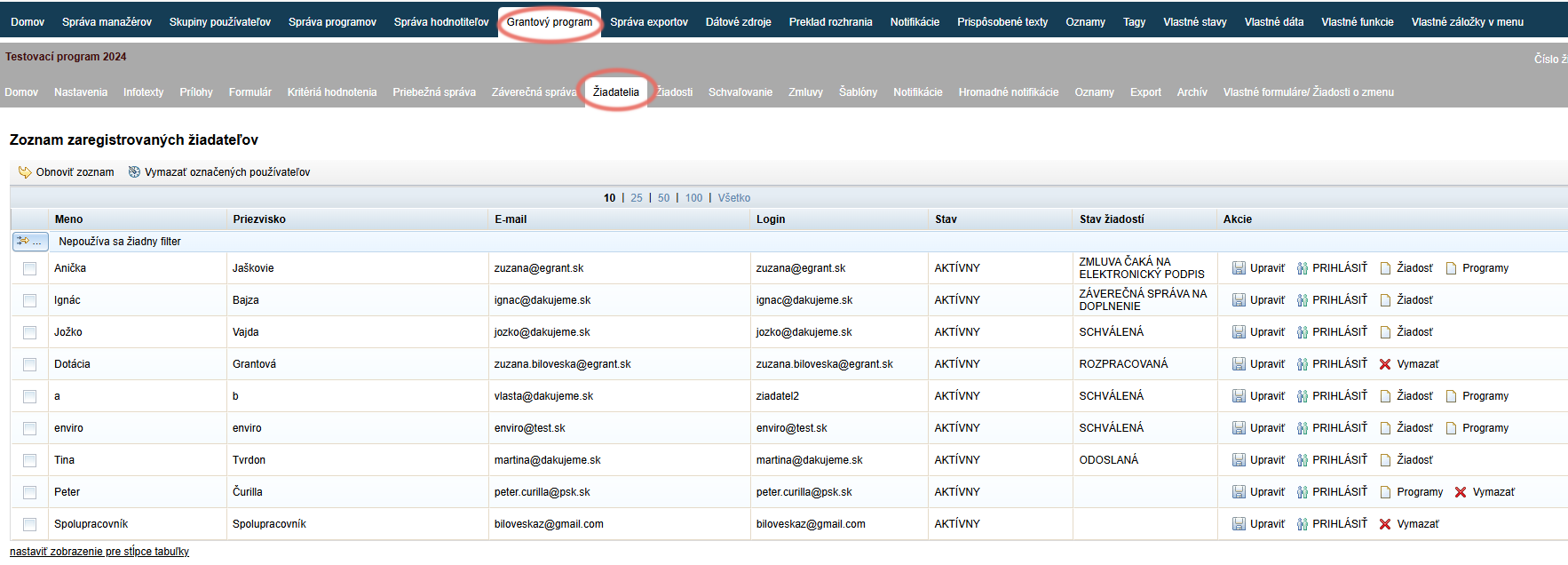
Full name entered by the applicant during registration
Email and login (the login is the same as the email provided during registration and cannot be changed afterwards)
Status of the applicant:
- AKTÍVNY – the applicant can use their account to the full extent.
- ČAKÁ NA OVERENIE – the applicant has registered for the programme and a link has been sent to their email; by clicking it, the applicant confirms the registration. After confirmation, the status changes to “Aktívny”.
- PASÍVNY – the applicant’s account is inactive; it is not possible to log in to it.
Application status – shows the current status of this applicant’s application (or several applications)
The “Akcie” column – in this column, you can:
- Edit the applicant’s profile (email, password, status) by clicking the “Upraviť” link.
- Log in as this applicant by clicking the “PRIHLÁSIŤ” link, if you have the “impersonifikácia” permission.
You can log back in as a manager by clicking the “Prihlásiť ako pôvodný užívateľ” link in the top right-hand corner of the screen. - View this applicant’s application by clicking the “Žiadosť” link (if the application has already been submitted).
- See which other programmes the applicant is registered in by clicking the “Programy” link (displayed only for applicants who are registered in more than one programme).
First aid with registration
If the applicant’s status is “ČAKÁ NA OVERENIE” and the applicant cannot find the email with the confirmation link, you can activate their account manually via the “Upraviť” link and change the status to “AKTÍVNY”.
First aid with a forgotten password
If the applicant has forgotten their login email or password, you can manually change their password via the “Upraviť” link (or also their email – however, the login will remain unchanged, identical to the email address used during the original registration).