
Once checked, submitted projects can be moved to voting. You can move projects to voting before voting is launched, but also while voting is already under way.
Find the project
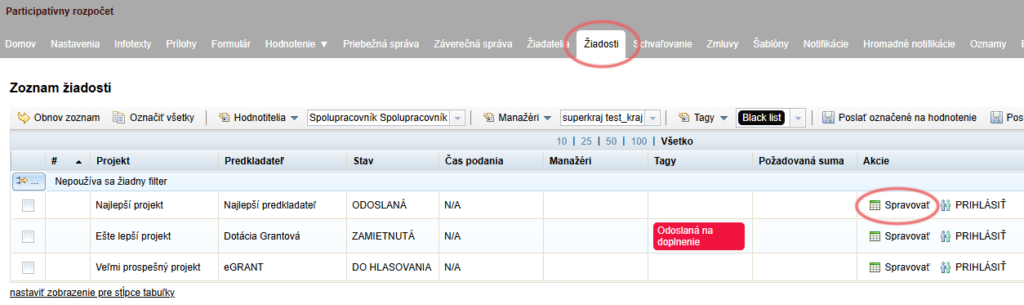
In the “Žiadosti” tab at programme level, find the project you want to move to voting.
In the “Akcie” column, click the “Spravovať” button.
Move it to voting
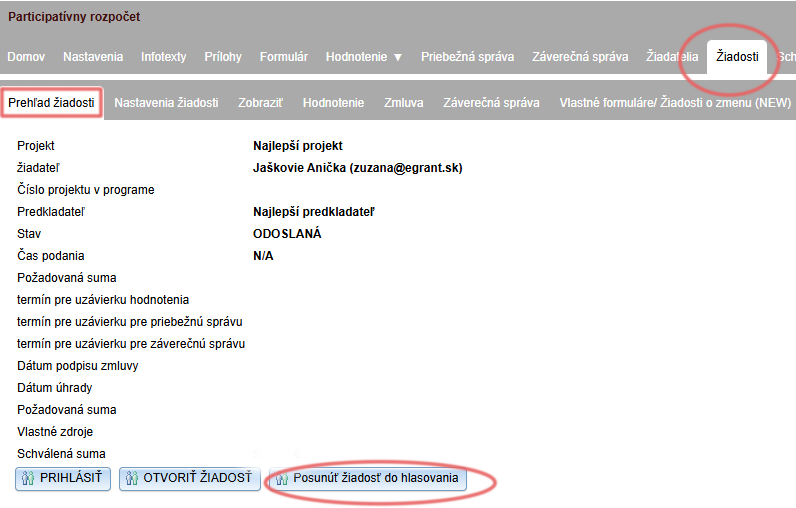
Another menu level opens – the application level – with its first tab, “Prehľad žiadosti”.
Click the “Posunúť žiadosť do hlasovania” button and confirm with “OK” in the pop-up window.
Application status
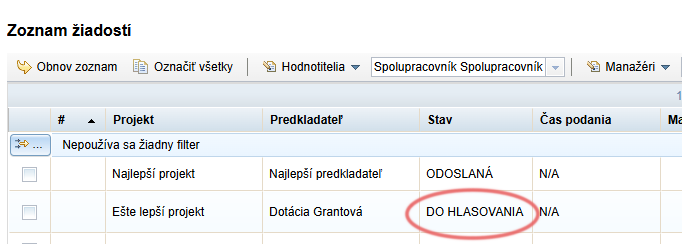
The application status changes to “DO HLASOVANIA”.
When voting is launched automatically according to the set date, this project will be displayed on the voting page, where the public will be able to vote for it.
After moving a project to voting
After a project has been moved to voting, a notification email is sent to the submitter. You can edit it in the “Notifikácie” tab (notification name: “Žiadosť posunutá do hlasovania”).
However, the project will only be displayed on the voting page once voting has been launched automatically according to the date you specified in the “Nastavenia hlasovania” tab.