Creating a document
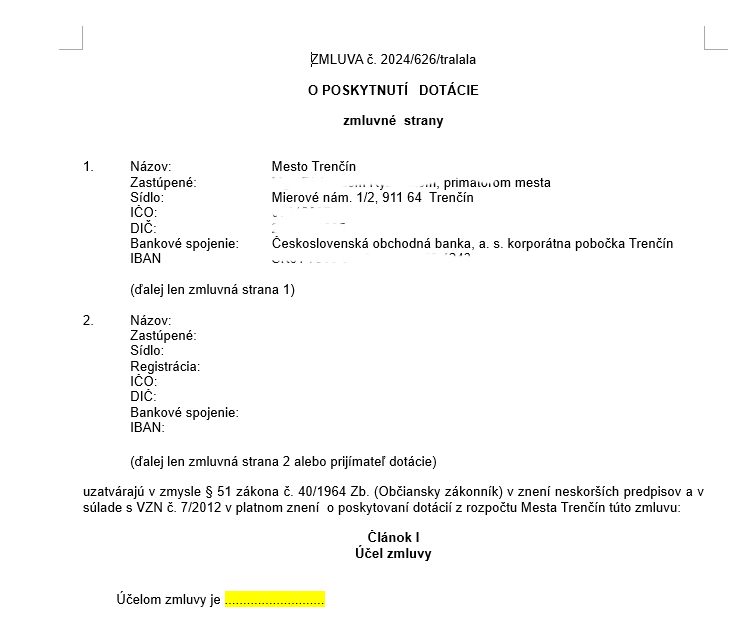
Create a sample document
Create a sample contract or other document in Word format (or OpenDocument)
- Make sure that the “Track Changes” feature is turned off in your Word document (the Review tab in Word).
Insert codes for pulling data
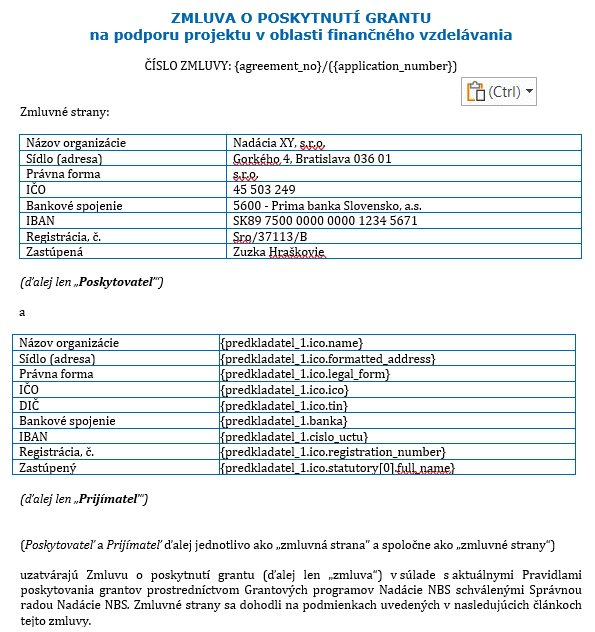
In the places where you want data to be loaded automatically, insert curly brackets containing a tag from the form or a system code.
- Only data that the applicant has entered in one of the forms, or that are assigned to the application by the system (e.g. the approved amount, the application number, etc.), can be loaded into the contract (or other documents).
- In the form from which you want to pull data, click in the structured tree on the item whose data you want to load into the document (e.g. the project title).
- In the “Základné údaje” section of this form item, copy the text in the “celý tag” field.
- Put this “celý tag” text in curly brackets {} and insert this code in the place in the document where you want the data to be pulled.
- Example of code for loading the project title: {projekt.projekt_nazov}
- You create the tags in a form when you build it, so always check the wording of the tag you want to put into the document (e.g. if you copy a contract template including tags from previous years – the current application form may have different tags).
If you need to load data into the document that the applicant filled in on the form as a table (e.g. budget items or a list of activities), proceed as follows:
- In the place in the document where you want to load the data, insert a table (1 column, 1 row) and put the code in it according to the examples below.
- Remove the table borders if necessary.
- You can also enter some default text in the table (e.g. a row name, such as: activity, From, To, etc.)
If it is a simple table where each data item represents one row:
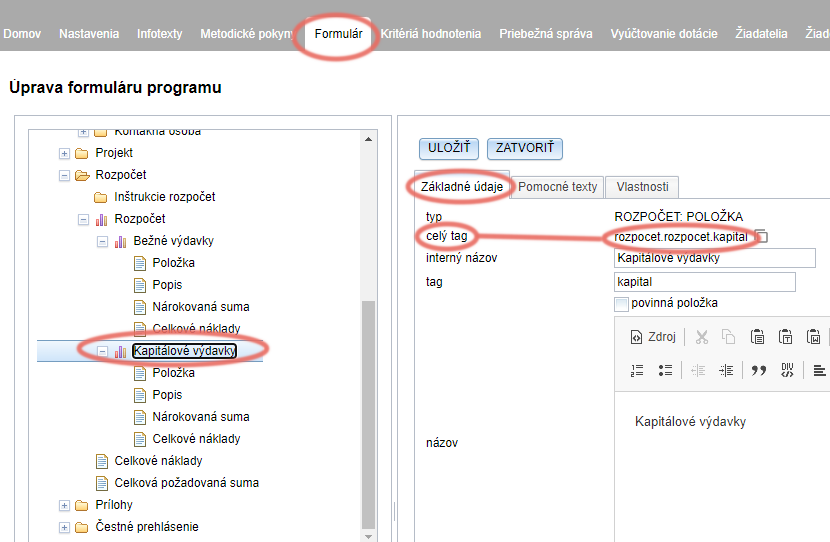
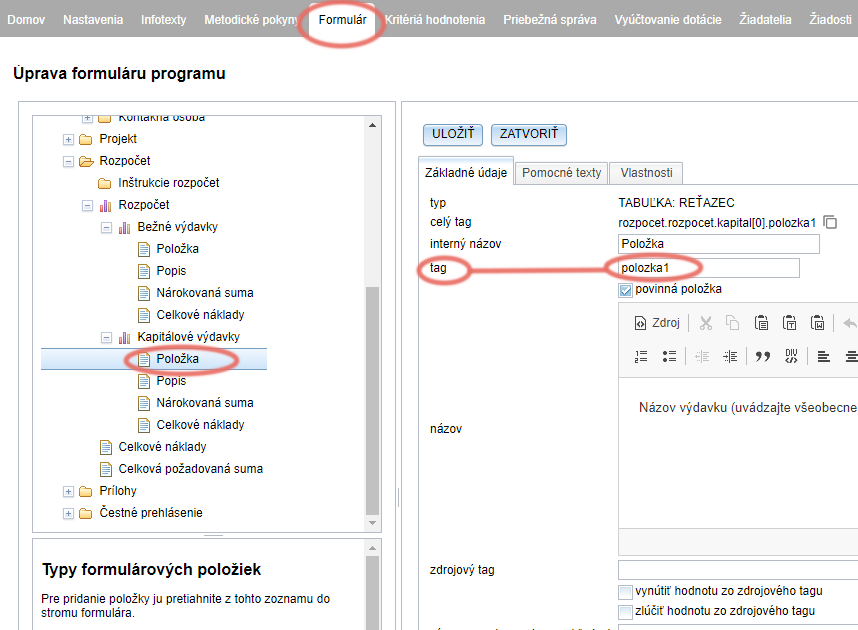
example: {TABLE:rozpocet.rozpocet.kapital} {polozka1}
{TABLE:rozpocet.rozpocet.kapital} = the full tag of the table in the form from which we want to load the data
{polozka1} = the tag of the specific table column in the form from which we want to load the data
If it is a table where each data item represents several rows (e.g. the activity name and the start and end dates of the activity):
After the text “TABLE”, we also add a full stop and a number (the number of rows), in our example 3, i.e. “TABLE.3:”
example {TABLE.3:harmonogram.aktivity}activity {aktivita} From {od.year} – {od.month} To {do.year} – {do.month}
{TABLE.3:harmonogram.aktivity} = the full tag of the table in the form
activity = the standalone word “activity” will always appear before each item pulled from the table
{aktivita} = the tag of the table column in the form from which we want to load the data (here, the activity name)
From = the standalone word “From” will always appear before each item pulled from the table
{od.year} = the tag of the table column in the form from which we want to load the data (here, the start year of the activity)
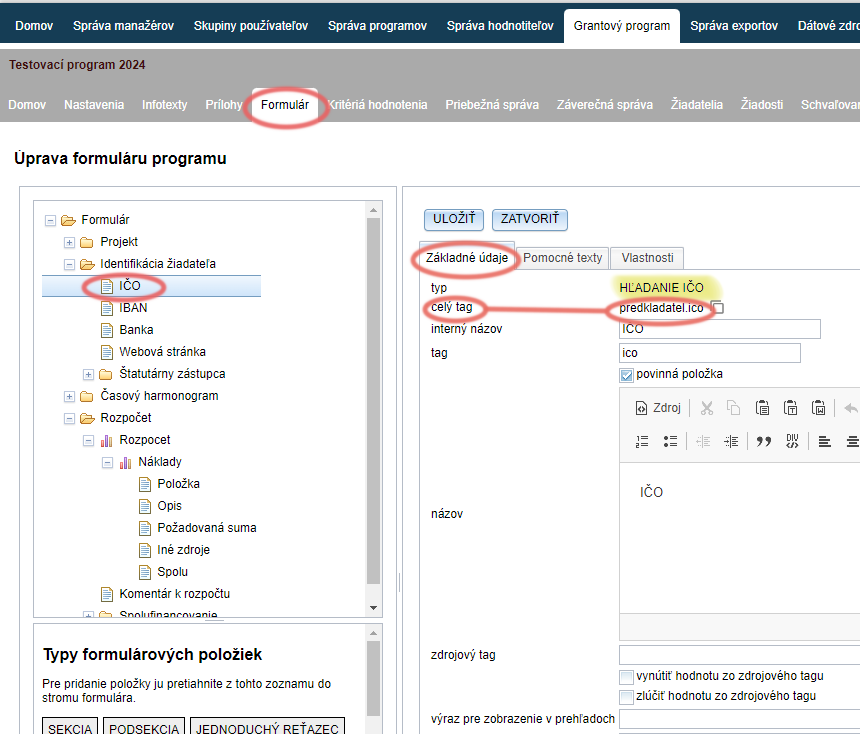
- In the form from which you want to pull data, click on the “HĽADANIE IČO” item in the structured tree.
- In the “Základné údaje” section of this form item, copy the text in the “celý tag” field.
- After the copied “celý tag”, add a . (full stop) and a suffix from the “Overview of codes for generating data” list (depending on which data from the register you want to pull – the name, address, name of the statutory representative, etc.)
- Remember to add the curly brackets {}.
- example of code for loading the entity name: {predkladatel.ico.name}
- example of code for loading the name of the statutory representative: {predkladatel.ico.statutory[0].full_name}
- example of code for loading the entity name: {predkladatel.ico.name}
- example of code for loading the name of the statutory representative: {predkladatel.ico.statutory[0].full_name}