
In the eGRANT system, you can generate contracts or other documents (in Word or PDF format) for individual applications and automatically send them to applicants by email. You can load specific data from any form in eGRANT into these documents (subsidy application, final report, custom form, etc.).
Contracts
When working with contracts in eGRANT, you mainly use the “Zmluvy” tab in the programme-level menu. Here you will find a list of all applications that have been approved (so it cannot happen that you send a contract to an applicant whose application has not been approved).
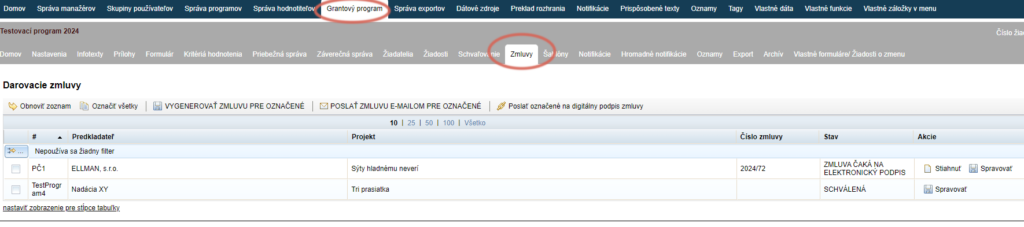
In this tab, you generate contracts and also send them directly from here to the applicants’ email addresses.
When creating contracts in eGRANT, remember:
Before generating contracts, set the contract numbering format in the “Nastavenia” tab at programme level.
Create the contract template in Word or OpenDocument format and make sure that the document does not contain various hidden formatting (e.g. paragraph numbering format or bullet format).
Remember to upload the contract template in the “Nastavenia” tab at programme level.
Remember that only data that are available somewhere can be loaded automatically into the contract (either the applicant has filled them in on one of the forms, or they are data recorded by eGRANT – e.g. the application submission date).
Also remember that the loaded data can only take a form that a Word document allows – how the data will look in the resulting contract is determined by the capabilities of the Word application.
When sending contracts to applicants, a notification email with the contract document attached is sent automatically.
You will find this notification email in the “Notifikácie” tab under the name “Zaslanie darovacej zmluvy”, and you can edit it uniformly for all programmes in the organisation-level menu, or only for a specific programme in the programme-level menu.
Applicants can also sign contracts electronically – this feature is subject to a charge; if you are interested, please contact us.
In the case of electronic signing, when contracts are sent to applicants, a different notification email is sent: “Notifikácia pre digitálne podpísanie zmluvy”.
Other documents
In eGRANT, you can also generate other documents in addition to contracts. For this, use the “Šablóny” tab in the programme-level menu.
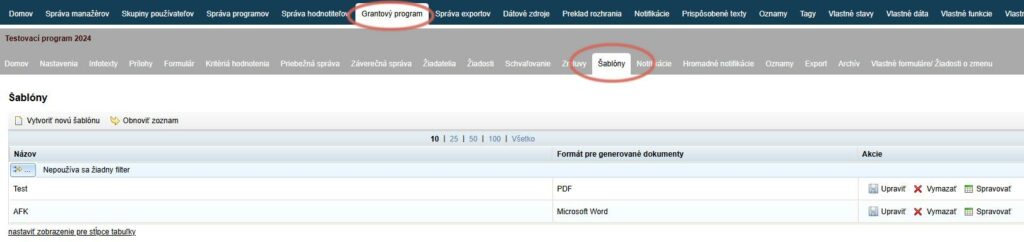
Here you upload the sample document, generate it for specific applications and also send it from here to the applicants’ email addresses.
You can use templates, for example, for:
- Several types of contracts – if you do not use one sample contract for all applications.
- Various opinions or requests – any official text documents that you need to send to applicants by email.
Attention!
Unlike contracts, to send other documents you must create a notification email in the “Hromadné notifikácie” tab at programme level.
When creating templates in eGRANT, remember:
Create the document template in Word or OpenDocument format and make sure that the document does not contain various hidden formatting (e.g. paragraph numbering format or bullet format).
You upload the document template in the “Šablóny” tab at programme level.
Remember that only data that are available somewhere can be loaded automatically into the template (either the applicant has filled them in on one of the forms, or they are data recorded by eGRANT – e.g. the application submission date).
Also remember that the loaded data can only take a form that a Word document allows – how the data will look in the resulting contract is determined by the capabilities of the Word application.
Before sending documents to applicants, you must first create a notification email to which the generated document will be attached. You create this notification email in the “Hromadné notifikácie” tab at programme level.